Module 1: Introduction to UX/UI Design, Industry Standards
Lesson 1: UX vs. UI Design
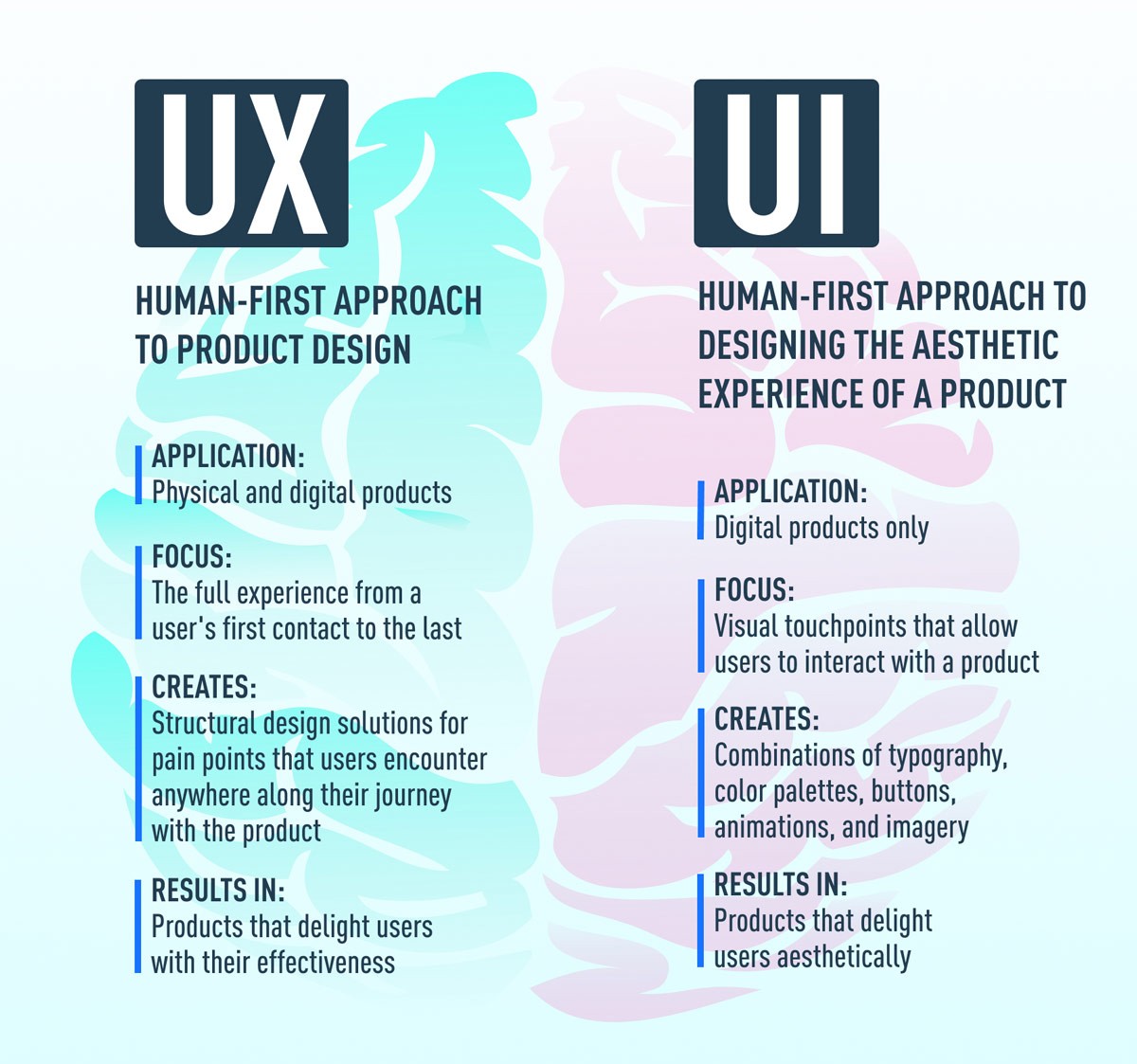
Overview: This lesson provides a detailed comparison between user experience (UX) and user interface (UI) design, explaining their roles, differences, and how they complement each other in product development.
Learning Outcomes:
By the end of this lesson, students will be able to:
Differentiate between UX and UI design.
Understand the roles and responsibilities of UX and UI designers.
Recognize how UX and UI complement each other in product development.
Apply basic UX and UI principles to their own design projects.
1. What is User Experience (UX) Design?
Definition:
User Experience (UX) design is a human-first approach to creating products, focusing on the overall feel of the user’s interaction with a company, its services, and products.
Coined by Don Norman in the late 1990s, UX design encompasses any interaction between a user and a company, not limited to digital experiences.
Principles of UX Design Next
Principles of UX Design:
Usability: Usability is about making products easy and efficient to use by simplifying the user journey and minimizing obstacles. It ensures that users can achieve their goals with minimal effort and frustration. Key aspects of usability include:
Effectiveness: How well users can achieve their goals.
Efficiency: How quickly users can complete tasks.
Satisfaction: How pleasant the experience is for users.
Resources:
Nielsen Norman Group on Usability
Usability.govAccessibility:
Accessibility involves designing products that are inclusive, accommodating users with various disabilities. This includes following guidelines like the Web Content Accessibility Guidelines (WCAG) to ensure that all users, regardless of their physical or cognitive abilities, can interact with the product effectively. Key considerations include:

Perceivable: Information and UI components must be presented in ways users can perceive.Operable: UI components must be operable by all users.
Understandable: Information and operation must be understandable.
Robust: Content must be robust enough to be interpreted reliably by a wide variety of user agents, including assistive technologies.
Resources:
Web Content Accessibility Guidelines (WCAG)
WebAIMDesirability:
Desirability focuses on creating engaging and emotionally appealing experiences through thoughtful design and interaction. It involves the aesthetic and emotional aspects of design that make a product enjoyable and satisfying to use. Elements of desirability include:

Visual Design: Aesthetic appeal and attractiveness.Emotional Design: How the product connects with users on an emotional level.
Brand Identity: Consistency with the brand's look and feel.
Resources:
Key Activities in UX Design:
Research: Conducting user and market research to understand user needs, behaviors, and pain points through surveys, interviews, and usability studies.
Information Architecture: Organizing and structuring content to create clear and intuitive user flows, including sitemap creation and content hierarchy.
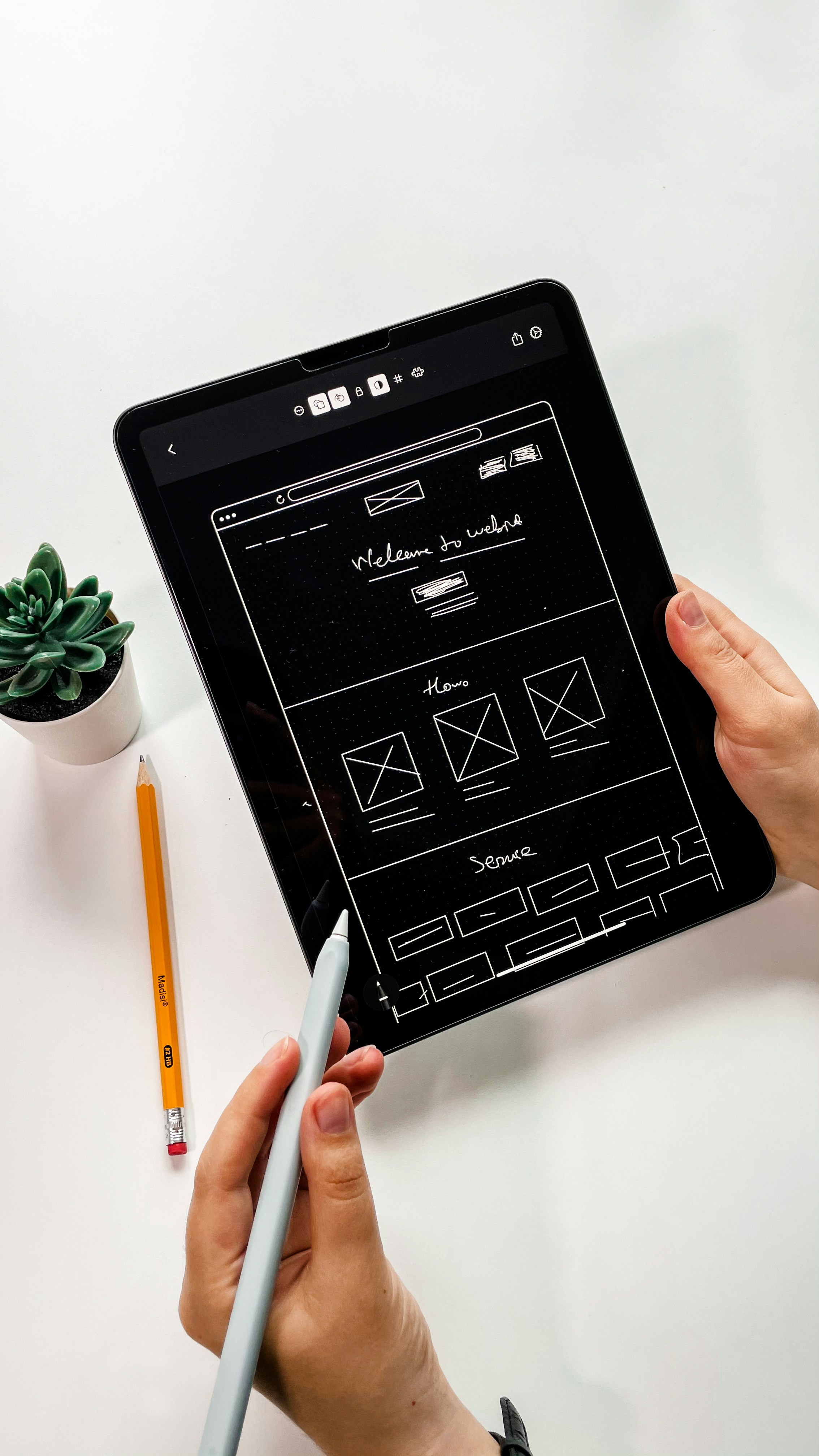
Wireframing and Prototyping: Developing wireframes and prototypes to visualize and test design solutions, iterating based on user feedback.
Testing and Iteration: Conducting usability tests to gather data on user interactions, refining designs through iterative testing and feedback loops.

We will explore this in greater depth in our upcoming lesson.We will explore this in greater depth in our upcoming lesson.What is User Interface (UI) Design?
Definition: UI design is focused on the visual and interactive elements of a product’s interface, aiming to create an engaging and user-friendly experience. This encompasses buttons, icons, typography, color schemes, and responsive design, ensuring the interface is both visually appealing and functional.
Detailed Aspects of UI Design:
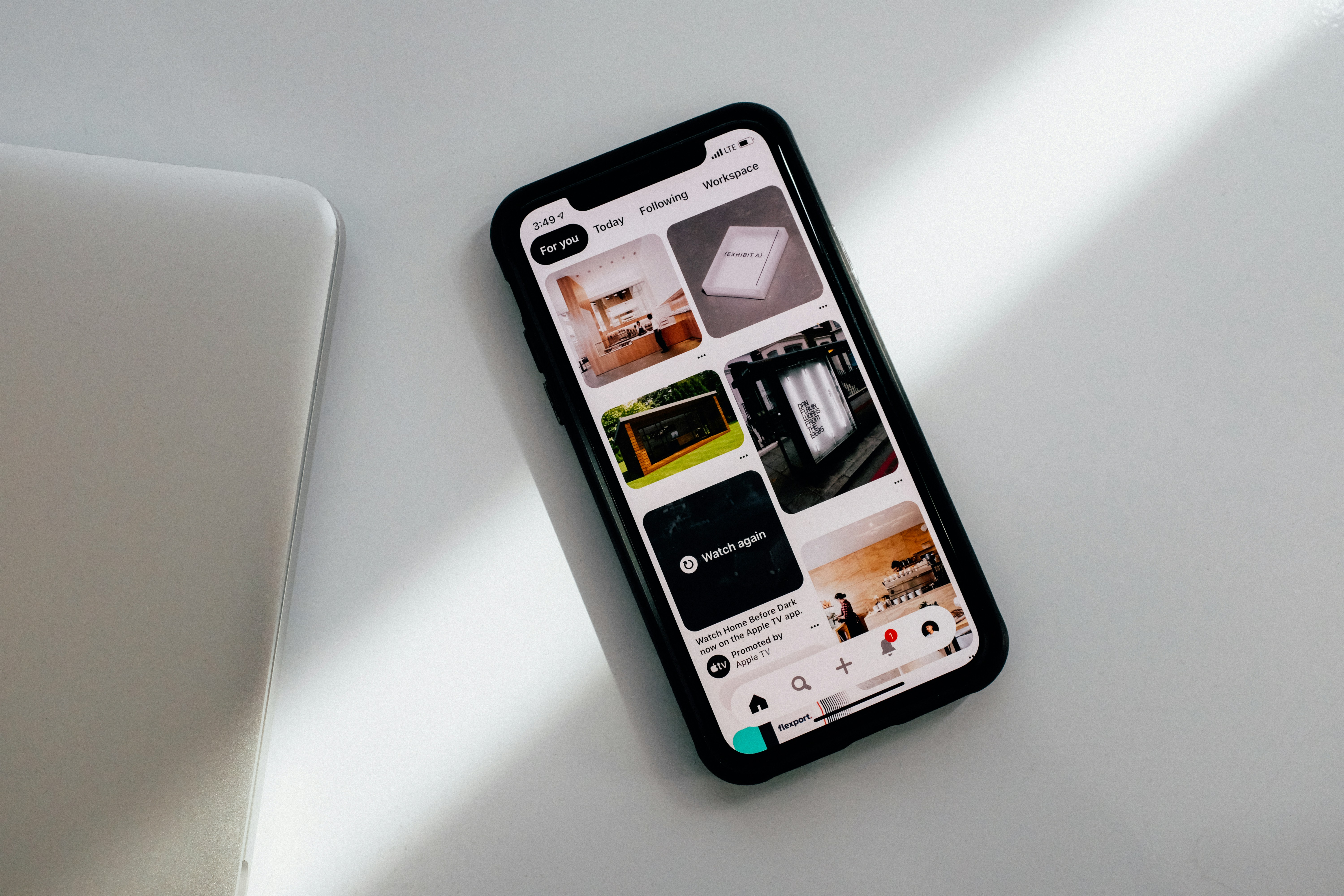
Visual Design: Crafting aesthetically pleasing interfaces that reflect the brand's identity and meet user expectations. This includes choosing appropriate color palettes, typography, imagery, and layout to create a cohesive and attractive visual experience.

Detailed Aspects of UI Design:
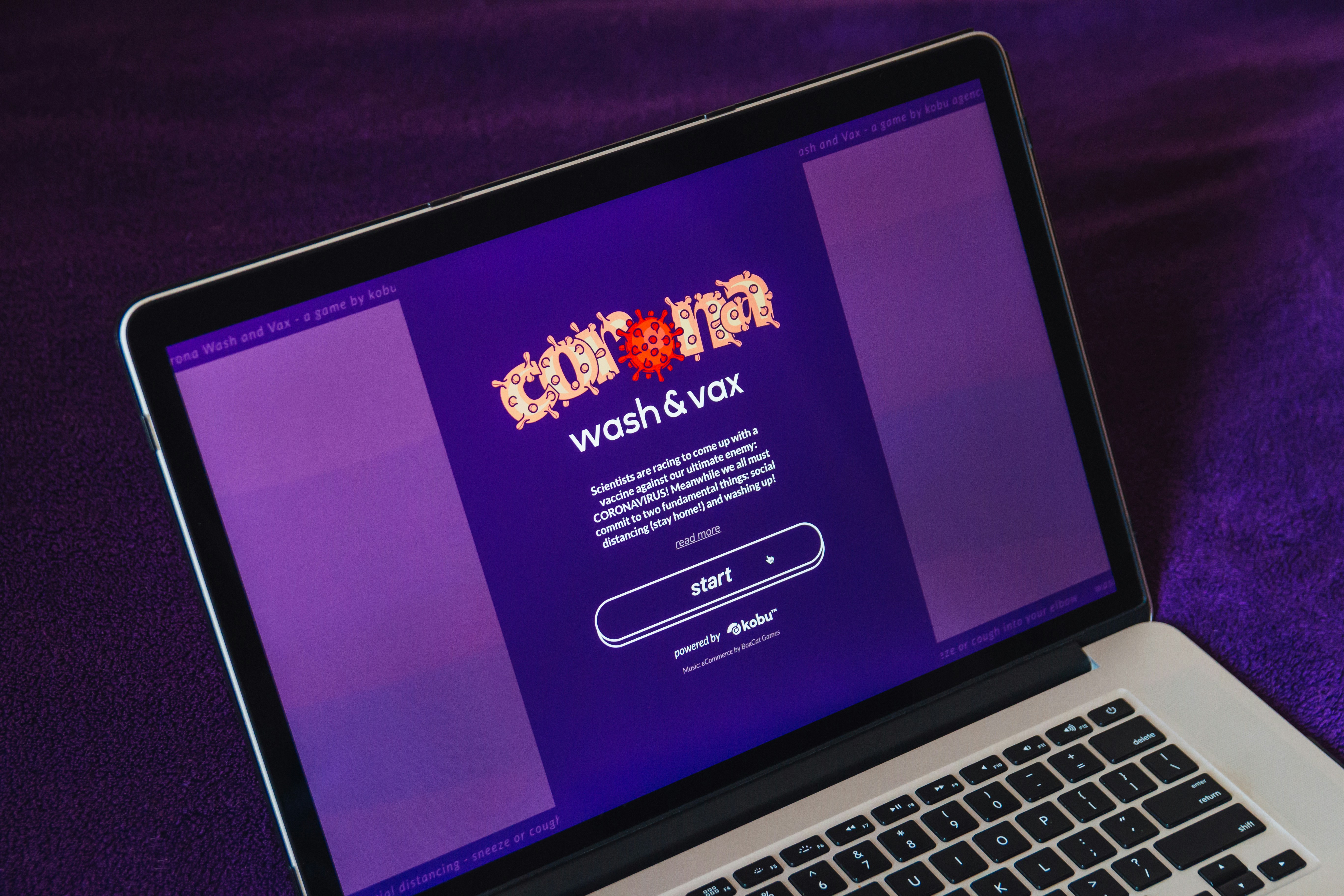
Interactive Design: Designing elements that facilitate intuitive interaction, such as buttons, sliders, and navigation menus. This involves ensuring that these elements respond appropriately to user actions (e.g., clicking, tapping, swiping) and provide feedback (e.g., animations, highlighting).
Detailed Aspects of UI Design:
Accessibility in UI: Making visual elements accessible to all users, including those with disabilities. This involves following guidelines such as the Web Content Accessibility Guidelines (WCAG) to ensure text is readable, interfaces are navigable via keyboard, and elements have sufficient color contrast.

Resources for Further Reading:
Nielsen Norman Group on UX Design: A comprehensive resource on UX principles and practices, offering insights into the relationship between UX and UI design.
WebAIM on Accessibility: Provides detailed guidelines and best practices for making web content accessible to people with disabilities.
Aarron Walter's Book on Designing for Emotion: Explores the role of emotional design in creating compelling user experiences.
Usability.gov on UI Design: Offers practical advice and methodologies for effective UI design, focusing on user-centered approaches.t.
Go to the Dashboard

Well done! You've reached the conclusion of this Module. We'll meet at the ensuing module.
Module 1: Introduction to UX/UI Design, Industry Standards
Lesson 1: UX vs. UI Design
Overview: This lesson provides a detailed comparison between user experience (UX) and user interface (UI) design, explaining their roles, differences, and how they complement each other in product development.
Learning Outcomes:
By the end of this lesson, students will be able to:
Differentiate between UX and UI design.
Understand the roles and responsibilities of UX and UI designers.
Recognize how UX and UI complement each other in product development.
Apply basic UX and UI principles to their own design projects.
1. What is User Experience (UX) Design?
Definition:
User Experience (UX) design is a human-first approach to creating products, focusing on the overall feel of the user’s interaction with a company, its services, and products.
Coined by Don Norman in the late 1990s, UX design encompasses any interaction between a user and a company, not limited to digital experiences.
Principles of UX Design Next
Principles of UX Design:
Usability: Usability is about making products easy and efficient to use by simplifying the user journey and minimizing obstacles. It ensures that users can achieve their goals with minimal effort and frustration. Key aspects of usability include:Effectiveness: How well users can achieve their goals.
Efficiency: How quickly users can complete tasks.
Satisfaction: How pleasant the experience is for users.
Resources:
Nielsen Norman Group on Usability
Usability.govAccessibility:
Accessibility involves designing products that are inclusive, accommodating users with various disabilities. This includes following guidelines like the Web Content Accessibility Guidelines (WCAG) to ensure that all users, regardless of their physical or cognitive abilities, can interact with the product effectively. Key considerations include:
Perceivable: Information and UI components must be presented in ways users can perceive.Operable: UI components must be operable by all users.
Understandable: Information and operation must be understandable.
Robust: Content must be robust enough to be interpreted reliably by a wide variety of user agents, including assistive technologies.
Resources:
Web Content Accessibility Guidelines (WCAG)
WebAIMDesirability:
Desirability focuses on creating engaging and emotionally appealing experiences through thoughtful design and interaction. It involves the aesthetic and emotional aspects of design that make a product enjoyable and satisfying to use. Elements of desirability include:
Visual Design: Aesthetic appeal and attractiveness.Emotional Design: How the product connects with users on an emotional level.
Brand Identity: Consistency with the brand's look and feel.
Resources:
Key Activities in UX Design:
Research: Conducting user and market research to understand user needs, behaviors, and pain points through surveys, interviews, and usability studies.
Information Architecture: Organizing and structuring content to create clear and intuitive user flows, including sitemap creation and content hierarchy.
Wireframing and Prototyping: Developing wireframes and prototypes to visualize and test design solutions, iterating based on user feedback.
Testing and Iteration: Conducting usability tests to gather data on user interactions, refining designs through iterative testing and feedback loops.
We will explore this in greater depth in our upcoming lesson.We will explore this in greater depth in our upcoming lesson.What is User Interface (UI) Design?
Definition: UI design is focused on the visual and interactive elements of a product’s interface, aiming to create an engaging and user-friendly experience. This encompasses buttons, icons, typography, color schemes, and responsive design, ensuring the interface is both visually appealing and functional.
Detailed Aspects of UI Design:
Visual Design: Crafting aesthetically pleasing interfaces that reflect the brand's identity and meet user expectations. This includes choosing appropriate color palettes, typography, imagery, and layout to create a cohesive and attractive visual experience.
Detailed Aspects of UI Design:
Interactive Design: Designing elements that facilitate intuitive interaction, such as buttons, sliders, and navigation menus. This involves ensuring that these elements respond appropriately to user actions (e.g., clicking, tapping, swiping) and provide feedback (e.g., animations, highlighting).
Detailed Aspects of UI Design:
Accessibility in UI: Making visual elements accessible to all users, including those with disabilities. This involves following guidelines such as the Web Content Accessibility Guidelines (WCAG) to ensure text is readable, interfaces are navigable via keyboard, and elements have sufficient color contrast.
Resources for Further Reading:
Nielsen Norman Group on UX Design: A comprehensive resource on UX principles and practices, offering insights into the relationship between UX and UI design.
WebAIM on Accessibility: Provides detailed guidelines and best practices for making web content accessible to people with disabilities.
Aarron Walter's Book on Designing for Emotion: Explores the role of emotional design in creating compelling user experiences.
Usability.gov on UI Design: Offers practical advice and methodologies for effective UI design, focusing on user-centered approaches.t.
Go to the Dashboard
Well done! You've reached the conclusion of this Module. We'll meet at the ensuing module.
Module 1: Introduction to UX/UI Design, Industry Standards
Lesson 1: UX vs. UI Design
Overview: This lesson provides a detailed comparison between user experience (UX) and user interface (UI) design, explaining their roles, differences, and how they complement each other in product development.
Learning Outcomes:
By the end of this lesson, students will be able to:
Differentiate between UX and UI design.
Understand the roles and responsibilities of UX and UI designers.
Recognize how UX and UI complement each other in product development.
Apply basic UX and UI principles to their own design projects.
1. What is User Experience (UX) Design?
Definition:
User Experience (UX) design is a human-first approach to creating products, focusing on the overall feel of the user’s interaction with a company, its services, and products.
Coined by Don Norman in the late 1990s, UX design encompasses any interaction between a user and a company, not limited to digital experiences.
Principles of UX Design Next
Principles of UX Design:
Usability: Usability is about making products easy and efficient to use by simplifying the user journey and minimizing obstacles. It ensures that users can achieve their goals with minimal effort and frustration. Key aspects of usability include:Effectiveness: How well users can achieve their goals.
Efficiency: How quickly users can complete tasks.
Satisfaction: How pleasant the experience is for users.
Resources:
Nielsen Norman Group on Usability
Usability.govAccessibility:
Accessibility involves designing products that are inclusive, accommodating users with various disabilities. This includes following guidelines like the Web Content Accessibility Guidelines (WCAG) to ensure that all users, regardless of their physical or cognitive abilities, can interact with the product effectively. Key considerations include:
Perceivable: Information and UI components must be presented in ways users can perceive.Operable: UI components must be operable by all users.
Understandable: Information and operation must be understandable.
Robust: Content must be robust enough to be interpreted reliably by a wide variety of user agents, including assistive technologies.
Resources:
Web Content Accessibility Guidelines (WCAG)
WebAIMDesirability:
Desirability focuses on creating engaging and emotionally appealing experiences through thoughtful design and interaction. It involves the aesthetic and emotional aspects of design that make a product enjoyable and satisfying to use. Elements of desirability include:
Visual Design: Aesthetic appeal and attractiveness.Emotional Design: How the product connects with users on an emotional level.
Brand Identity: Consistency with the brand's look and feel.
Resources:
Key Activities in UX Design:
Research: Conducting user and market research to understand user needs, behaviors, and pain points through surveys, interviews, and usability studies.
Information Architecture: Organizing and structuring content to create clear and intuitive user flows, including sitemap creation and content hierarchy.
Wireframing and Prototyping: Developing wireframes and prototypes to visualize and test design solutions, iterating based on user feedback.
Testing and Iteration: Conducting usability tests to gather data on user interactions, refining designs through iterative testing and feedback loops.
We will explore this in greater depth in our upcoming lesson.We will explore this in greater depth in our upcoming lesson.What is User Interface (UI) Design?
Definition: UI design is focused on the visual and interactive elements of a product’s interface, aiming to create an engaging and user-friendly experience. This encompasses buttons, icons, typography, color schemes, and responsive design, ensuring the interface is both visually appealing and functional.
Detailed Aspects of UI Design:
Visual Design: Crafting aesthetically pleasing interfaces that reflect the brand's identity and meet user expectations. This includes choosing appropriate color palettes, typography, imagery, and layout to create a cohesive and attractive visual experience.
Detailed Aspects of UI Design:
Interactive Design: Designing elements that facilitate intuitive interaction, such as buttons, sliders, and navigation menus. This involves ensuring that these elements respond appropriately to user actions (e.g., clicking, tapping, swiping) and provide feedback (e.g., animations, highlighting).
Detailed Aspects of UI Design:
Accessibility in UI: Making visual elements accessible to all users, including those with disabilities. This involves following guidelines such as the Web Content Accessibility Guidelines (WCAG) to ensure text is readable, interfaces are navigable via keyboard, and elements have sufficient color contrast.
Resources for Further Reading:
Nielsen Norman Group on UX Design: A comprehensive resource on UX principles and practices, offering insights into the relationship between UX and UI design.
WebAIM on Accessibility: Provides detailed guidelines and best practices for making web content accessible to people with disabilities.
Aarron Walter's Book on Designing for Emotion: Explores the role of emotional design in creating compelling user experiences.
Usability.gov on UI Design: Offers practical advice and methodologies for effective UI design, focusing on user-centered approaches.t.
Go to the Dashboard
Well done! You've reached the conclusion of this Module. We'll meet at the ensuing module.
Module 1: Introduction to UX/UI Design, Industry Standards
Lesson 1: UX vs. UI Design
Overview: This lesson provides a detailed comparison between user experience (UX) and user interface (UI) design, explaining their roles, differences, and how they complement each other in product development.
Learning Outcomes:
By the end of this lesson, students will be able to:
Differentiate between UX and UI design.
Understand the roles and responsibilities of UX and UI designers.
Recognize how UX and UI complement each other in product development.
Apply basic UX and UI principles to their own design projects.
1. What is User Experience (UX) Design?
Definition:
User Experience (UX) design is a human-first approach to creating products, focusing on the overall feel of the user’s interaction with a company, its services, and products.
Coined by Don Norman in the late 1990s, UX design encompasses any interaction between a user and a company, not limited to digital experiences.
Principles of UX Design Next
Principles of UX Design:
Usability: Usability is about making products easy and efficient to use by simplifying the user journey and minimizing obstacles. It ensures that users can achieve their goals with minimal effort and frustration. Key aspects of usability include:Effectiveness: How well users can achieve their goals.
Efficiency: How quickly users can complete tasks.
Satisfaction: How pleasant the experience is for users.
Resources:
Nielsen Norman Group on Usability
Usability.govAccessibility:
Accessibility involves designing products that are inclusive, accommodating users with various disabilities. This includes following guidelines like the Web Content Accessibility Guidelines (WCAG) to ensure that all users, regardless of their physical or cognitive abilities, can interact with the product effectively. Key considerations include:
Perceivable: Information and UI components must be presented in ways users can perceive.Operable: UI components must be operable by all users.
Understandable: Information and operation must be understandable.
Robust: Content must be robust enough to be interpreted reliably by a wide variety of user agents, including assistive technologies.
Resources:
Web Content Accessibility Guidelines (WCAG)
WebAIMDesirability:
Desirability focuses on creating engaging and emotionally appealing experiences through thoughtful design and interaction. It involves the aesthetic and emotional aspects of design that make a product enjoyable and satisfying to use. Elements of desirability include:
Visual Design: Aesthetic appeal and attractiveness.Emotional Design: How the product connects with users on an emotional level.
Brand Identity: Consistency with the brand's look and feel.
Resources:
Key Activities in UX Design:
Research: Conducting user and market research to understand user needs, behaviors, and pain points through surveys, interviews, and usability studies.
Information Architecture: Organizing and structuring content to create clear and intuitive user flows, including sitemap creation and content hierarchy.
Wireframing and Prototyping: Developing wireframes and prototypes to visualize and test design solutions, iterating based on user feedback.
Testing and Iteration: Conducting usability tests to gather data on user interactions, refining designs through iterative testing and feedback loops.
We will explore this in greater depth in our upcoming lesson.We will explore this in greater depth in our upcoming lesson.What is User Interface (UI) Design?
Definition: UI design is focused on the visual and interactive elements of a product’s interface, aiming to create an engaging and user-friendly experience. This encompasses buttons, icons, typography, color schemes, and responsive design, ensuring the interface is both visually appealing and functional.
Detailed Aspects of UI Design:
Visual Design: Crafting aesthetically pleasing interfaces that reflect the brand's identity and meet user expectations. This includes choosing appropriate color palettes, typography, imagery, and layout to create a cohesive and attractive visual experience.
Detailed Aspects of UI Design:
Interactive Design: Designing elements that facilitate intuitive interaction, such as buttons, sliders, and navigation menus. This involves ensuring that these elements respond appropriately to user actions (e.g., clicking, tapping, swiping) and provide feedback (e.g., animations, highlighting).
Detailed Aspects of UI Design:
Accessibility in UI: Making visual elements accessible to all users, including those with disabilities. This involves following guidelines such as the Web Content Accessibility Guidelines (WCAG) to ensure text is readable, interfaces are navigable via keyboard, and elements have sufficient color contrast.
Resources for Further Reading:
Nielsen Norman Group on UX Design: A comprehensive resource on UX principles and practices, offering insights into the relationship between UX and UI design.
WebAIM on Accessibility: Provides detailed guidelines and best practices for making web content accessible to people with disabilities.
Aarron Walter's Book on Designing for Emotion: Explores the role of emotional design in creating compelling user experiences.
Usability.gov on UI Design: Offers practical advice and methodologies for effective UI design, focusing on user-centered approaches.t.
Go to the Dashboard
Well done! You've reached the conclusion of this Module. We'll meet at the ensuing module.
Module 1: Introduction to UX/UI Design, Industry Standards
Lesson 1: UX vs. UI Design
Overview: This lesson provides a detailed comparison between user experience (UX) and user interface (UI) design, explaining their roles, differences, and how they complement each other in product development.
Learning Outcomes:
By the end of this lesson, students will be able to:
Differentiate between UX and UI design.
Understand the roles and responsibilities of UX and UI designers.
Recognize how UX and UI complement each other in product development.
Apply basic UX and UI principles to their own design projects.
1. What is User Experience (UX) Design?
Definition:
User Experience (UX) design is a human-first approach to creating products, focusing on the overall feel of the user’s interaction with a company, its services, and products.
Coined by Don Norman in the late 1990s, UX design encompasses any interaction between a user and a company, not limited to digital experiences.
Principles of UX Design Next
Principles of UX Design:
Usability: Usability is about making products easy and efficient to use by simplifying the user journey and minimizing obstacles. It ensures that users can achieve their goals with minimal effort and frustration. Key aspects of usability include:Effectiveness: How well users can achieve their goals.
Efficiency: How quickly users can complete tasks.
Satisfaction: How pleasant the experience is for users.
Resources:
Nielsen Norman Group on Usability
Usability.govAccessibility:
Accessibility involves designing products that are inclusive, accommodating users with various disabilities. This includes following guidelines like the Web Content Accessibility Guidelines (WCAG) to ensure that all users, regardless of their physical or cognitive abilities, can interact with the product effectively. Key considerations include:
Perceivable: Information and UI components must be presented in ways users can perceive.Operable: UI components must be operable by all users.
Understandable: Information and operation must be understandable.
Robust: Content must be robust enough to be interpreted reliably by a wide variety of user agents, including assistive technologies.
Resources:
Web Content Accessibility Guidelines (WCAG)
WebAIMDesirability:
Desirability focuses on creating engaging and emotionally appealing experiences through thoughtful design and interaction. It involves the aesthetic and emotional aspects of design that make a product enjoyable and satisfying to use. Elements of desirability include:
Visual Design: Aesthetic appeal and attractiveness.Emotional Design: How the product connects with users on an emotional level.
Brand Identity: Consistency with the brand's look and feel.
Resources:
Key Activities in UX Design:
Research: Conducting user and market research to understand user needs, behaviors, and pain points through surveys, interviews, and usability studies.
Information Architecture: Organizing and structuring content to create clear and intuitive user flows, including sitemap creation and content hierarchy.
Wireframing and Prototyping: Developing wireframes and prototypes to visualize and test design solutions, iterating based on user feedback.
Testing and Iteration: Conducting usability tests to gather data on user interactions, refining designs through iterative testing and feedback loops.
We will explore this in greater depth in our upcoming lesson.We will explore this in greater depth in our upcoming lesson.What is User Interface (UI) Design?
Definition: UI design is focused on the visual and interactive elements of a product’s interface, aiming to create an engaging and user-friendly experience. This encompasses buttons, icons, typography, color schemes, and responsive design, ensuring the interface is both visually appealing and functional.
Detailed Aspects of UI Design:
Visual Design: Crafting aesthetically pleasing interfaces that reflect the brand's identity and meet user expectations. This includes choosing appropriate color palettes, typography, imagery, and layout to create a cohesive and attractive visual experience.
Detailed Aspects of UI Design:
Interactive Design: Designing elements that facilitate intuitive interaction, such as buttons, sliders, and navigation menus. This involves ensuring that these elements respond appropriately to user actions (e.g., clicking, tapping, swiping) and provide feedback (e.g., animations, highlighting).
Detailed Aspects of UI Design:
Accessibility in UI: Making visual elements accessible to all users, including those with disabilities. This involves following guidelines such as the Web Content Accessibility Guidelines (WCAG) to ensure text is readable, interfaces are navigable via keyboard, and elements have sufficient color contrast.
Resources for Further Reading:
Nielsen Norman Group on UX Design: A comprehensive resource on UX principles and practices, offering insights into the relationship between UX and UI design.
WebAIM on Accessibility: Provides detailed guidelines and best practices for making web content accessible to people with disabilities.
Aarron Walter's Book on Designing for Emotion: Explores the role of emotional design in creating compelling user experiences.
Usability.gov on UI Design: Offers practical advice and methodologies for effective UI design, focusing on user-centered approaches.t.
Go to the Dashboard
Well done! You've reached the conclusion of this Module. We'll meet at the ensuing module.
Module 1: Introduction to UX/UI Design, Industry Standards
Lesson 1: UX vs. UI Design
Overview: This lesson provides a detailed comparison between user experience (UX) and user interface (UI) design, explaining their roles, differences, and how they complement each other in product development.
Learning Outcomes:
By the end of this lesson, students will be able to:
Differentiate between UX and UI design.
Understand the roles and responsibilities of UX and UI designers.
Recognize how UX and UI complement each other in product development.
Apply basic UX and UI principles to their own design projects.
1. What is User Experience (UX) Design?
Definition:
User Experience (UX) design is a human-first approach to creating products, focusing on the overall feel of the user’s interaction with a company, its services, and products.
Coined by Don Norman in the late 1990s, UX design encompasses any interaction between a user and a company, not limited to digital experiences.
Principles of UX Design Next
Principles of UX Design:
Usability: Usability is about making products easy and efficient to use by simplifying the user journey and minimizing obstacles. It ensures that users can achieve their goals with minimal effort and frustration. Key aspects of usability include:Effectiveness: How well users can achieve their goals.
Efficiency: How quickly users can complete tasks.
Satisfaction: How pleasant the experience is for users.
Resources:
Nielsen Norman Group on Usability
Usability.govAccessibility:
Accessibility involves designing products that are inclusive, accommodating users with various disabilities. This includes following guidelines like the Web Content Accessibility Guidelines (WCAG) to ensure that all users, regardless of their physical or cognitive abilities, can interact with the product effectively. Key considerations include:
Perceivable: Information and UI components must be presented in ways users can perceive.Operable: UI components must be operable by all users.
Understandable: Information and operation must be understandable.
Robust: Content must be robust enough to be interpreted reliably by a wide variety of user agents, including assistive technologies.
Resources:
Web Content Accessibility Guidelines (WCAG)
WebAIMDesirability:
Desirability focuses on creating engaging and emotionally appealing experiences through thoughtful design and interaction. It involves the aesthetic and emotional aspects of design that make a product enjoyable and satisfying to use. Elements of desirability include:
Visual Design: Aesthetic appeal and attractiveness.Emotional Design: How the product connects with users on an emotional level.
Brand Identity: Consistency with the brand's look and feel.
Resources:
Key Activities in UX Design:
Research: Conducting user and market research to understand user needs, behaviors, and pain points through surveys, interviews, and usability studies.
Information Architecture: Organizing and structuring content to create clear and intuitive user flows, including sitemap creation and content hierarchy.
Wireframing and Prototyping: Developing wireframes and prototypes to visualize and test design solutions, iterating based on user feedback.
Testing and Iteration: Conducting usability tests to gather data on user interactions, refining designs through iterative testing and feedback loops.
We will explore this in greater depth in our upcoming lesson.We will explore this in greater depth in our upcoming lesson.What is User Interface (UI) Design?
Definition: UI design is focused on the visual and interactive elements of a product’s interface, aiming to create an engaging and user-friendly experience. This encompasses buttons, icons, typography, color schemes, and responsive design, ensuring the interface is both visually appealing and functional.
Detailed Aspects of UI Design:
Visual Design: Crafting aesthetically pleasing interfaces that reflect the brand's identity and meet user expectations. This includes choosing appropriate color palettes, typography, imagery, and layout to create a cohesive and attractive visual experience.
Detailed Aspects of UI Design:
Interactive Design: Designing elements that facilitate intuitive interaction, such as buttons, sliders, and navigation menus. This involves ensuring that these elements respond appropriately to user actions (e.g., clicking, tapping, swiping) and provide feedback (e.g., animations, highlighting).
Detailed Aspects of UI Design:
Accessibility in UI: Making visual elements accessible to all users, including those with disabilities. This involves following guidelines such as the Web Content Accessibility Guidelines (WCAG) to ensure text is readable, interfaces are navigable via keyboard, and elements have sufficient color contrast.
Resources for Further Reading:
Nielsen Norman Group on UX Design: A comprehensive resource on UX principles and practices, offering insights into the relationship between UX and UI design.
WebAIM on Accessibility: Provides detailed guidelines and best practices for making web content accessible to people with disabilities.
Aarron Walter's Book on Designing for Emotion: Explores the role of emotional design in creating compelling user experiences.
Usability.gov on UI Design: Offers practical advice and methodologies for effective UI design, focusing on user-centered approaches.t.
Go to the Dashboard
Well done! You've reached the conclusion of this Module. We'll meet at the ensuing module.
Module 1: Introduction to UX/UI Design, Industry Standards
Lesson 1: UX vs. UI Design
Overview: This lesson provides a detailed comparison between user experience (UX) and user interface (UI) design, explaining their roles, differences, and how they complement each other in product development.
Learning Outcomes:
By the end of this lesson, students will be able to:
Differentiate between UX and UI design.
Understand the roles and responsibilities of UX and UI designers.
Recognize how UX and UI complement each other in product development.
Apply basic UX and UI principles to their own design projects.
1. What is User Experience (UX) Design?
Definition:
User Experience (UX) design is a human-first approach to creating products, focusing on the overall feel of the user’s interaction with a company, its services, and products.
Coined by Don Norman in the late 1990s, UX design encompasses any interaction between a user and a company, not limited to digital experiences.
Principles of UX Design Next
Principles of UX Design:
Usability: Usability is about making products easy and efficient to use by simplifying the user journey and minimizing obstacles. It ensures that users can achieve their goals with minimal effort and frustration. Key aspects of usability include:Effectiveness: How well users can achieve their goals.
Efficiency: How quickly users can complete tasks.
Satisfaction: How pleasant the experience is for users.
Resources:
Nielsen Norman Group on Usability
Usability.govAccessibility:
Accessibility involves designing products that are inclusive, accommodating users with various disabilities. This includes following guidelines like the Web Content Accessibility Guidelines (WCAG) to ensure that all users, regardless of their physical or cognitive abilities, can interact with the product effectively. Key considerations include:
Perceivable: Information and UI components must be presented in ways users can perceive.Operable: UI components must be operable by all users.
Understandable: Information and operation must be understandable.
Robust: Content must be robust enough to be interpreted reliably by a wide variety of user agents, including assistive technologies.
Resources:
Web Content Accessibility Guidelines (WCAG)
WebAIMDesirability:
Desirability focuses on creating engaging and emotionally appealing experiences through thoughtful design and interaction. It involves the aesthetic and emotional aspects of design that make a product enjoyable and satisfying to use. Elements of desirability include:
Visual Design: Aesthetic appeal and attractiveness.Emotional Design: How the product connects with users on an emotional level.
Brand Identity: Consistency with the brand's look and feel.
Resources:
Key Activities in UX Design:
Research: Conducting user and market research to understand user needs, behaviors, and pain points through surveys, interviews, and usability studies.
Information Architecture: Organizing and structuring content to create clear and intuitive user flows, including sitemap creation and content hierarchy.
Wireframing and Prototyping: Developing wireframes and prototypes to visualize and test design solutions, iterating based on user feedback.
Testing and Iteration: Conducting usability tests to gather data on user interactions, refining designs through iterative testing and feedback loops.
We will explore this in greater depth in our upcoming lesson.We will explore this in greater depth in our upcoming lesson.What is User Interface (UI) Design?
Definition: UI design is focused on the visual and interactive elements of a product’s interface, aiming to create an engaging and user-friendly experience. This encompasses buttons, icons, typography, color schemes, and responsive design, ensuring the interface is both visually appealing and functional.
Detailed Aspects of UI Design:
Visual Design: Crafting aesthetically pleasing interfaces that reflect the brand's identity and meet user expectations. This includes choosing appropriate color palettes, typography, imagery, and layout to create a cohesive and attractive visual experience.
Detailed Aspects of UI Design:
Interactive Design: Designing elements that facilitate intuitive interaction, such as buttons, sliders, and navigation menus. This involves ensuring that these elements respond appropriately to user actions (e.g., clicking, tapping, swiping) and provide feedback (e.g., animations, highlighting).
Detailed Aspects of UI Design:
Accessibility in UI: Making visual elements accessible to all users, including those with disabilities. This involves following guidelines such as the Web Content Accessibility Guidelines (WCAG) to ensure text is readable, interfaces are navigable via keyboard, and elements have sufficient color contrast.
Resources for Further Reading:
Nielsen Norman Group on UX Design: A comprehensive resource on UX principles and practices, offering insights into the relationship between UX and UI design.
WebAIM on Accessibility: Provides detailed guidelines and best practices for making web content accessible to people with disabilities.
Aarron Walter's Book on Designing for Emotion: Explores the role of emotional design in creating compelling user experiences.
Usability.gov on UI Design: Offers practical advice and methodologies for effective UI design, focusing on user-centered approaches.t.
Go to the Dashboard
Well done! You've reached the conclusion of this Module. We'll meet at the ensuing module.
Module 1: Introduction to UX/UI Design, Industry Standards
Lesson 1: UX vs. UI Design
Overview: This lesson provides a detailed comparison between user experience (UX) and user interface (UI) design, explaining their roles, differences, and how they complement each other in product development.
Learning Outcomes:
By the end of this lesson, students will be able to:
Differentiate between UX and UI design.
Understand the roles and responsibilities of UX and UI designers.
Recognize how UX and UI complement each other in product development.
Apply basic UX and UI principles to their own design projects.
1. What is User Experience (UX) Design?
Definition:
User Experience (UX) design is a human-first approach to creating products, focusing on the overall feel of the user’s interaction with a company, its services, and products.
Coined by Don Norman in the late 1990s, UX design encompasses any interaction between a user and a company, not limited to digital experiences.
Principles of UX Design Next
Principles of UX Design:
Usability: Usability is about making products easy and efficient to use by simplifying the user journey and minimizing obstacles. It ensures that users can achieve their goals with minimal effort and frustration. Key aspects of usability include:Effectiveness: How well users can achieve their goals.
Efficiency: How quickly users can complete tasks.
Satisfaction: How pleasant the experience is for users.
Resources:
Nielsen Norman Group on Usability
Usability.govAccessibility:
Accessibility involves designing products that are inclusive, accommodating users with various disabilities. This includes following guidelines like the Web Content Accessibility Guidelines (WCAG) to ensure that all users, regardless of their physical or cognitive abilities, can interact with the product effectively. Key considerations include:
Perceivable: Information and UI components must be presented in ways users can perceive.Operable: UI components must be operable by all users.
Understandable: Information and operation must be understandable.
Robust: Content must be robust enough to be interpreted reliably by a wide variety of user agents, including assistive technologies.
Resources:
Web Content Accessibility Guidelines (WCAG)
WebAIMDesirability:
Desirability focuses on creating engaging and emotionally appealing experiences through thoughtful design and interaction. It involves the aesthetic and emotional aspects of design that make a product enjoyable and satisfying to use. Elements of desirability include:
Visual Design: Aesthetic appeal and attractiveness.Emotional Design: How the product connects with users on an emotional level.
Brand Identity: Consistency with the brand's look and feel.
Resources:
Key Activities in UX Design:
Research: Conducting user and market research to understand user needs, behaviors, and pain points through surveys, interviews, and usability studies.
Information Architecture: Organizing and structuring content to create clear and intuitive user flows, including sitemap creation and content hierarchy.
Wireframing and Prototyping: Developing wireframes and prototypes to visualize and test design solutions, iterating based on user feedback.
Testing and Iteration: Conducting usability tests to gather data on user interactions, refining designs through iterative testing and feedback loops.
We will explore this in greater depth in our upcoming lesson.We will explore this in greater depth in our upcoming lesson.What is User Interface (UI) Design?
Definition: UI design is focused on the visual and interactive elements of a product’s interface, aiming to create an engaging and user-friendly experience. This encompasses buttons, icons, typography, color schemes, and responsive design, ensuring the interface is both visually appealing and functional.
Detailed Aspects of UI Design:
Visual Design: Crafting aesthetically pleasing interfaces that reflect the brand's identity and meet user expectations. This includes choosing appropriate color palettes, typography, imagery, and layout to create a cohesive and attractive visual experience.
Detailed Aspects of UI Design:
Interactive Design: Designing elements that facilitate intuitive interaction, such as buttons, sliders, and navigation menus. This involves ensuring that these elements respond appropriately to user actions (e.g., clicking, tapping, swiping) and provide feedback (e.g., animations, highlighting).
Detailed Aspects of UI Design:
Accessibility in UI: Making visual elements accessible to all users, including those with disabilities. This involves following guidelines such as the Web Content Accessibility Guidelines (WCAG) to ensure text is readable, interfaces are navigable via keyboard, and elements have sufficient color contrast.
Resources for Further Reading:
Nielsen Norman Group on UX Design: A comprehensive resource on UX principles and practices, offering insights into the relationship between UX and UI design.
WebAIM on Accessibility: Provides detailed guidelines and best practices for making web content accessible to people with disabilities.
Aarron Walter's Book on Designing for Emotion: Explores the role of emotional design in creating compelling user experiences.
Usability.gov on UI Design: Offers practical advice and methodologies for effective UI design, focusing on user-centered approaches.t.
Go to the Dashboard
Well done! You've reached the conclusion of this Module. We'll meet at the ensuing module.